¶ What Credits Are Used For
Credits are used to access advanced features in Morpho Studio, including:
- AI-powered features
- Advanced crafts
- Advanced elements
- Advanced templates
- Other advanced features
The number of Credits deducted depends on the feature and actual usage.
¶ How to Get Credits
You can get Credits through a subscription, a one-time purchase, or platform activities.
¶ Subscription Plans
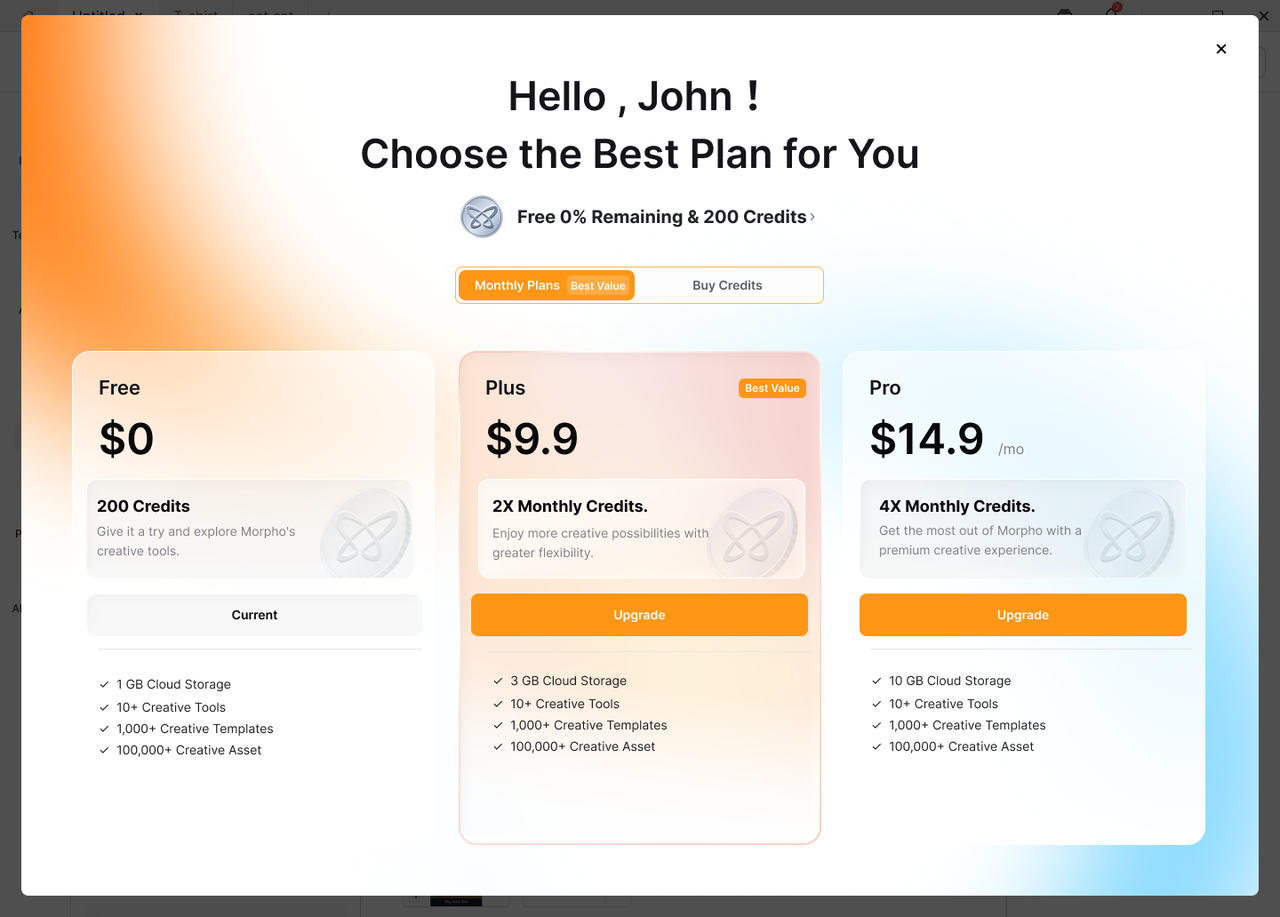
A subscription is the recommended way to get Credits and access additional plan benefits.
Morpho Studio offers two subscription plans:
- Plus: Includes 2x Credits
- Pro: Includes 4x Credits
Subscriptions renew monthly and can be canceled at any time.
¶ Purchase Credits
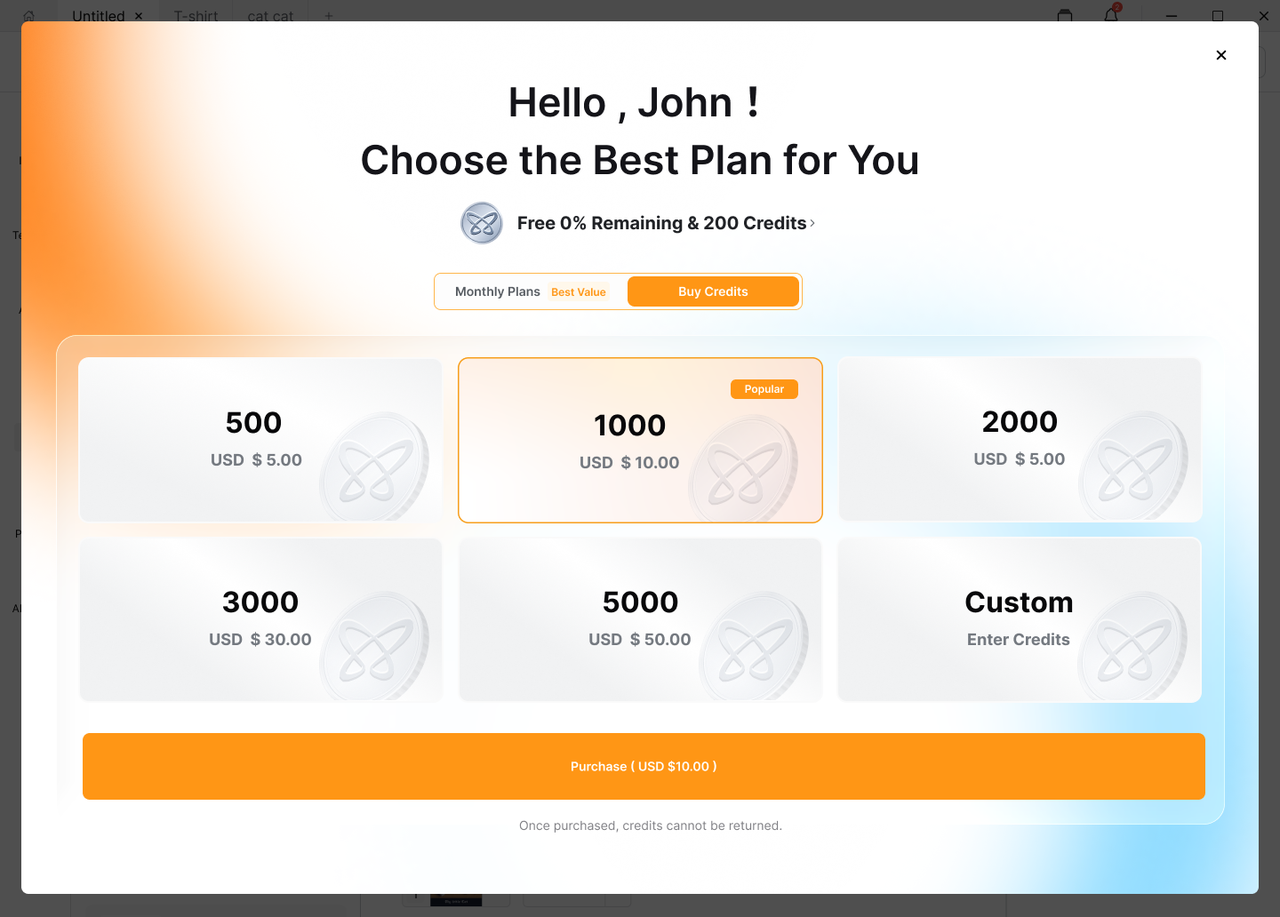
You can purchase additional Credits separately:
- 1,000 Credits — US$10
Purchased Credits can be added to Credits received through a subscription and used together.
¶ Bonus Credits
Morpho Studio may award Bonus Credits through monthly activities and promotions.
Purchased Credits and Bonus Credits do not expire.
¶ Before You Begin
Before getting Credits:
- Register a Morpho Studio account and sign in.
- Prepare a supported payment method, such as Apple Pay, Google Pay, Link, or a bank card.
Payments are processed securely through Stripe.
¶ Get Credits
- Sign in to your Morpho Studio account.
- Open the Credits Center.
- Choose one of the following options:
- Select Subscription Plans to subscribe to Plus or Pro.
- Select Buy Credits to make a one-time Credit purchase.
- Review the Credits, plan benefits, and total amount.
- Select a payment method.
- Complete the payment through Stripe.
After a successful payment, the Credits will be added to the account used for the transaction.
¶ Check Your Credit Balance and History
Open the Credits Center to view your available Credit balance and transaction history.
Credit purchase records include:
- Item
- Date
- Credits
- Cost
Credits received through subscriptions, purchases, and platform activities may also appear in your Credit history.
¶ View Images Created with Credits
When you use Credits to generate an image with an AI-powered feature, the generated image is saved in Created Images.
You can open Created Images to view your previously generated images.
¶ Credit Policies
- Purchased Credits and Bonus Credits do not expire.
- Subscription Credits and separately purchased Credits can be added to the same account and used together.
- Credit purchases are non-refundable and cannot be exchanged.
- Credits are deducted based on the feature used and actual usage.
- Credits cannot be transferred between accounts.
¶ Payment and Credit Issues
¶ Payment Failed
If a payment fails:
- Confirm that your payment information is correct.
- Check that sufficient funds or credit are available.
- Contact your bank or payment provider if the transaction is declined.
If the issue continues, contact Morpho Studio Support.
¶ Payment Completed but Credits Were Not Received
First, confirm that you are signed in to the account used for the purchase. Then refresh the Credits Center and check your Credit history.
If the Credits are still missing, contact Morpho Studio Support and provide:
- The order or payment reference
- The payment date and time
- The subscription plan or number of Credits purchased
- A description of the issue
- A payment confirmation screenshot
Do not provide your full card number or card security code.