¶ Morpho UV Printer Product Glossary
This article helps users identify the main structures and functional components of the Morpho UV Printer.
Applicable product: Morpho Pro UV Printer (i3200 Printhead)
¶ Front View
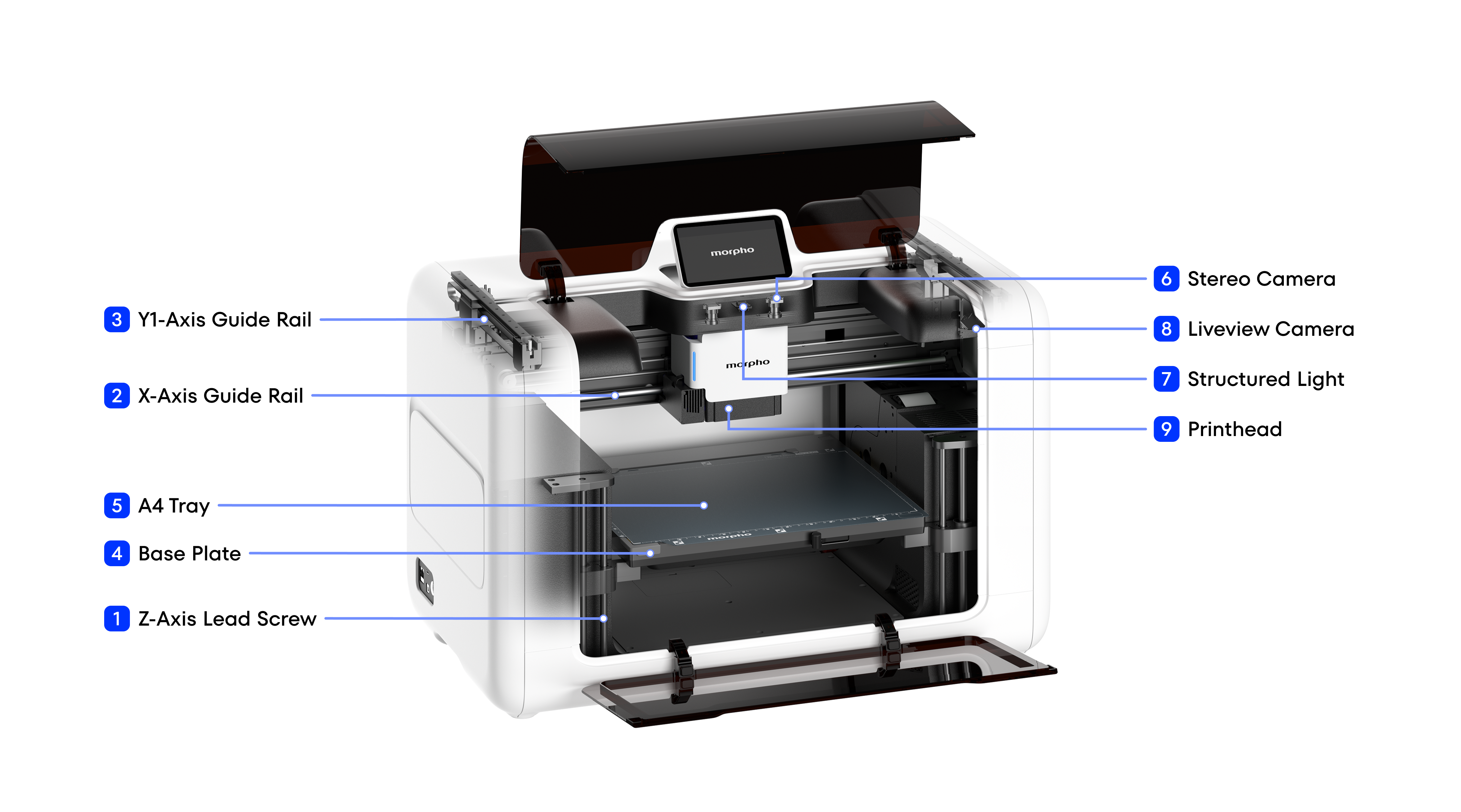
| Name | Function |
|---|---|
| 1. Z-Axis Lead Screw | Converts motor rotation into vertical movement of the print bed to adjust the print height. |
| 2. X-Axis Guide Rail | Guides the printhead carriage during horizontal scanning along the X axis. |
| 3. Y1-Axis Guide Rail | Guides and supports the X-axis rail gantry along the Y direction. |
| 4. Base Plate | Supports the print bed and provides the mounting reference. |
| 5. A4 Tray | Holds smaller-format substrates for printing. |
| 6. Stereo Camera | Captures stereoscopic image data from the print area to support 3D positioning, object recognition, or calibration. |
| 7. Structured Light | Projects a patterned light field onto the print area to support surface-height and contour measurement. |
| 8. Liveview Camera | Provides a real-time view of the print area for setup and print monitoring. |
| 9. Printhead | Jets UV ink onto the substrate according to the print data to form images and texture. |
¶ Side View
The Side View shows the external ports, maintenance components, internal air-circulation path, and automatic printhead-maintenance components with the cover open.
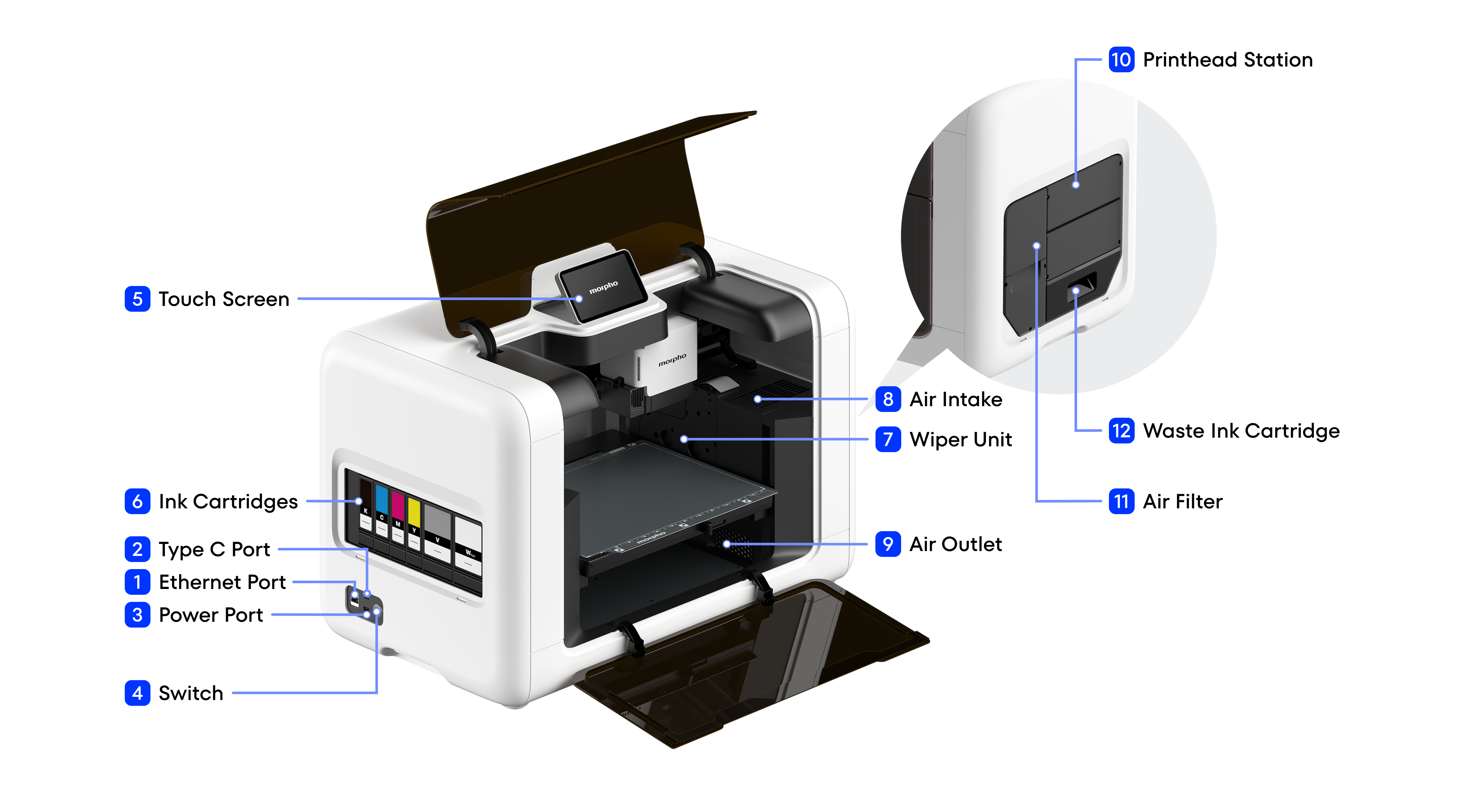
| Name | Function |
|---|---|
| 1. Ethernet Port | Provides a wired network connection for printer communication and data transfer. |
| 2. Type-C Port | Provides a USB data connection for local computer communication or service access. |
| 3. Power Port | Connects the printer to an external power source. |
| 4. Switch | Turns the printer's main power supply on or off. |
| 5. Touch Screen | Displays device status and provides access to operation, settings, and maintenance functions. |
| 6. Ink Cartridges | Store and supply the corresponding colors of UV ink to the ink delivery system. |
| 7. Wiper Unit | Removes residual ink from the printhead surface. |
| 8. Air Intake | Draws air directly from above the print bed, where VOC levels may be higher, into the air filter. |
| 9. Air Outlet | Returns air to the printer after VOC filtration. |
| 10. Printhead Station | Provides the parking, capping, moisturizing, cleaning, and maintenance position for the printhead. |
| 11. Air Filter | Filters VOC gases from the air circulating through the printer's internal ventilation path. |
| 12. Waste Ink Cartridge | Collects waste ink generated during printhead cleaning and other maintenance operations. |
¶ Printhead View
The Printhead View shows the printhead module and its associated imaging, ink-delivery, thermal-control, status-indication, and UV-curing components.
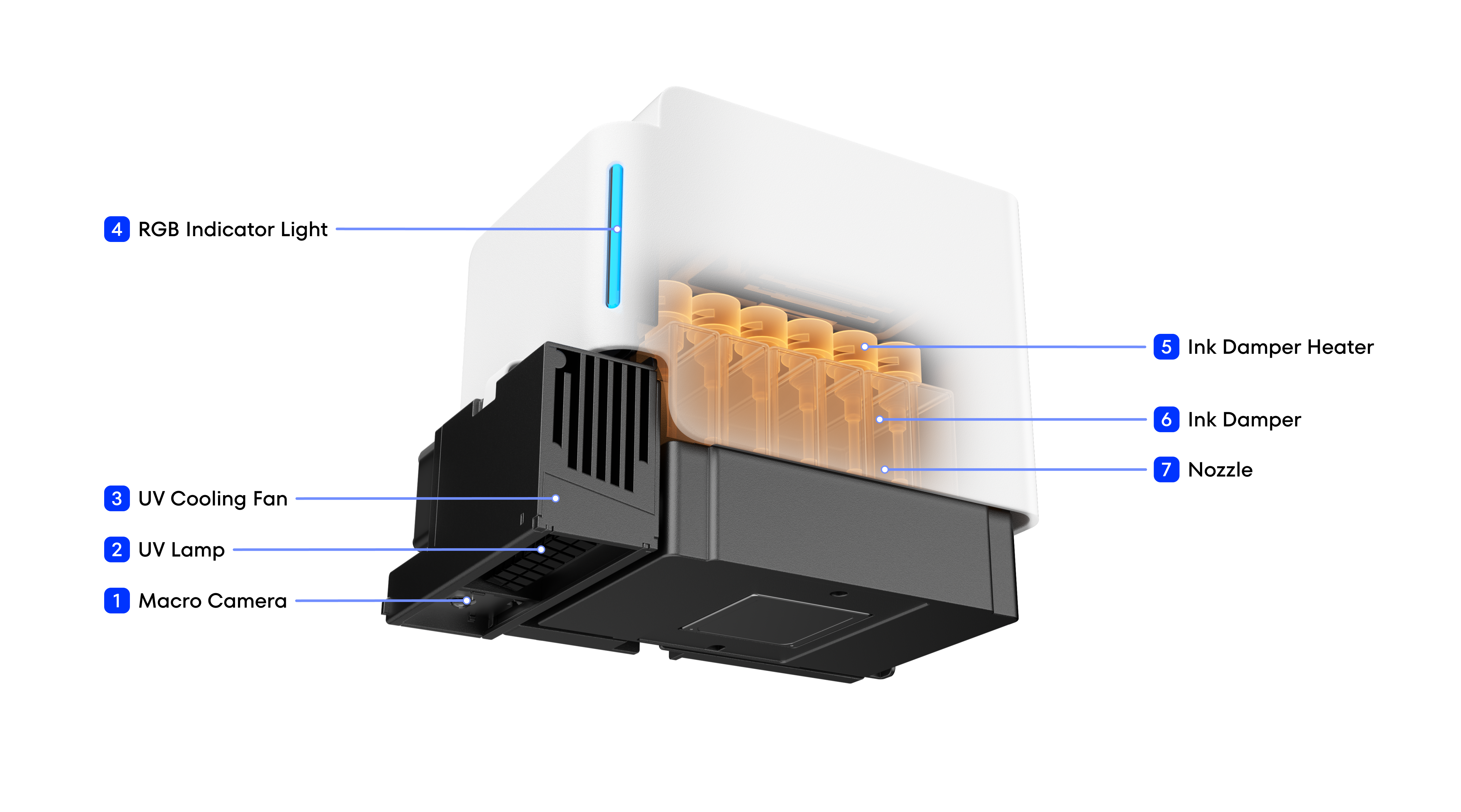
| Name | Function |
|---|---|
| 1. Macro Camera | Captures close-range images of the substrate and print area to support positioning, alignment, and inspection. |
| 2. UV Lamp | Emits UV light to cure the UV ink after it is deposited on the substrate. |
| 3. UV Cooling Fan | Dissipates heat from the UV lamp to help maintain its operating temperature. |
| 4. RGB Indicator Light | Indicates the printer status through different light colors. |
| 5. Printhead heating module | Maintain the temperature of the printhead module. |
| 6. Ink Damper | Heats the printhead module to keep ink viscosity stable at low ambient temperatures. |
| 7. Nozzle | Ejects precisely controlled UV ink droplets according to the print data. |