This guide introduces the UV hot-stamping principle, applicable scope, required materials and equipment, image preparation requirements, operating steps, foil lamination process, result verification, and troubleshooting guidance.
Quick navigation: Process Principle · Applicable Scope · Preparation · Steps · Verify the Result · Troubleshooting and Exception Handling
Start the operation: Go directly to Steps · Single-Layer Hot Stamping · Dual-Layer Hot Stamping · Hot-Stamping Foil Lamination Process
¶ 1. Process Principle
UV printer hot stamping combines UV printing with heat-transfer foil lamination. Depending on the workflow, dedicated hot-stamping white ink or hot-stamping varnish can be printed on the print material and UV-cured to form the transferable area. This guide uses hot-stamping varnish. The foil film is then applied and pressed with heat and pressure in a laminator, allowing the metallic foil to transfer onto the specified design area.
¶ 2. Applicable Scope
The parameters in this guide apply only to the Morpho Pro UV Printer with an i3200 printhead. Parameters for the Morpho Standard UV Printer with an F1080 printhead are not included in this version of the guide and will be added in a future update.
The instructions and screenshots in this guide are based on Morpho Studio version 0.32.1-38259. If a future software update changes any screen, control, or workflow covered in this guide, this article and its screenshots will be updated accordingly.
¶ 3. Preparation
¶ Materials and Equipment
- Morpho Pro UV Printer with an i3200 printhead.
- Morpho Studio.
- Print material (the item to be printed), with a surface free from dust, grease, moisture, fingerprints, and other contaminants.
- Dedicated hot-stamping varnish. This guide uses hot-stamping varnish; compatible hot-stamping white ink may be used in other workflows.
- Gold foil film and/or silver foil film.
- A laminator with an adjustable roller gap.
- Trial materials. Use a flat, rigid cardboard sheet with rounded corners or the device-specific leader sheet to assist foil feeding. The cardboard width must be less than the width of the hot-stamping foil. If neither is available, use another flat material, ensuring its width does not exceed the laminator's maximum supported width.
- The color image for printing and the hot-stamping area image or images required for the design.
¶ Notes
| 1 | Confirm the Total Thickness After Printing Confirm the total thickness against the adjustable roller gap of the laminator. Account for the print material thickness, the standard white ink layer, and the printed hot-stamping varnish relief layer. If the total thickness exceeds the laminator adjustment range, lamination may not be possible after printing. |
| 2 | Use Hot-Stamping Varnish for This Guide Hot-stamping white ink or hot-stamping varnish may be used for hot stamping. This guide uses hot-stamping varnish, so follow the varnish-specific settings and checks below. |
| 3 | Keep the Print Material Surface Clean Before hot stamping, make sure the print material surface is free from dust, oil, moisture, fingerprints, and other contaminants. Contaminants can affect foil adhesion and the final hot-stamping result. |
| 4 | Control Varnish Thickness and Relief Height Difference The printed hot-stamping varnish thickness should be at least 0.2 mm. For raised hot-stamping effects, keep the height difference between areas within a reasonable range. Excessive height differences may cause uneven foil transfer, wrinkling, tearing, or missing foil in local areas. |
¶ Image Preparation Requirements
- For your own design, prepare one color image and one or more hot-stamping area images as required. The single-layer example in this guide uses two images: one color image and one silver-stamping area image. The dual-layer example uses three images: one color image, one silver-stamping area image, and one gold-stamping area image.
- Keep the original colors in the color image. Areas that do not require hot stamping do not need to be changed to black or transparent.
- The hot-stamping area image must have clear edges and complete contours. Avoid gradients, semi-transparent areas, and lines that are too thin. A line width of 0.3–0.5 mm is recommended. Lines that are too thin may break or lose detail during hot stamping. The spacing between adjacent lines or cutout areas should be at least 0.4 mm. Insufficient spacing may cause pattern adhesion or incomplete foil transfer, affecting the final hot-stamping result.
- If the image texture needs to be preserved, use the textured hot-stamping area image directly. If no texture is required, fill the hot-stamping areas with white and the remaining areas with solid black or transparency.
- Save the color image and the hot-stamping area image separately, then place them in their corresponding layers in the printing software.
Future software versions will support color separation directly within the software, so users will not need to manually process the images in Photoshop or other image-editing software.
¶ 4. Steps
¶ Single-Layer Hot Stamping
- Clean the print material surface, then place the print material in the correct position on the printer tray.
- Open Morpho Studio and tap Create New.

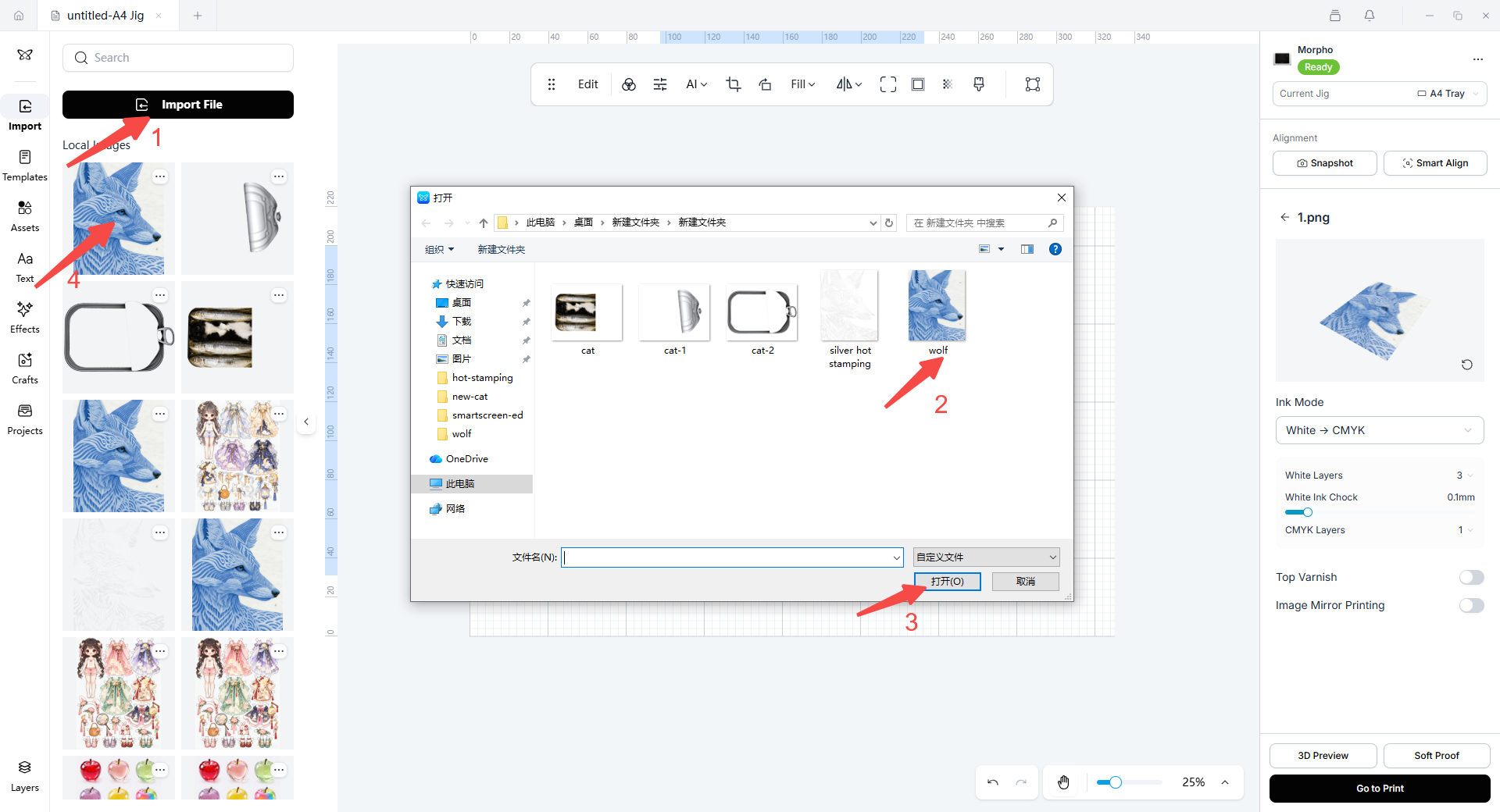
- Tap Import File to import the hot-stamping design file.
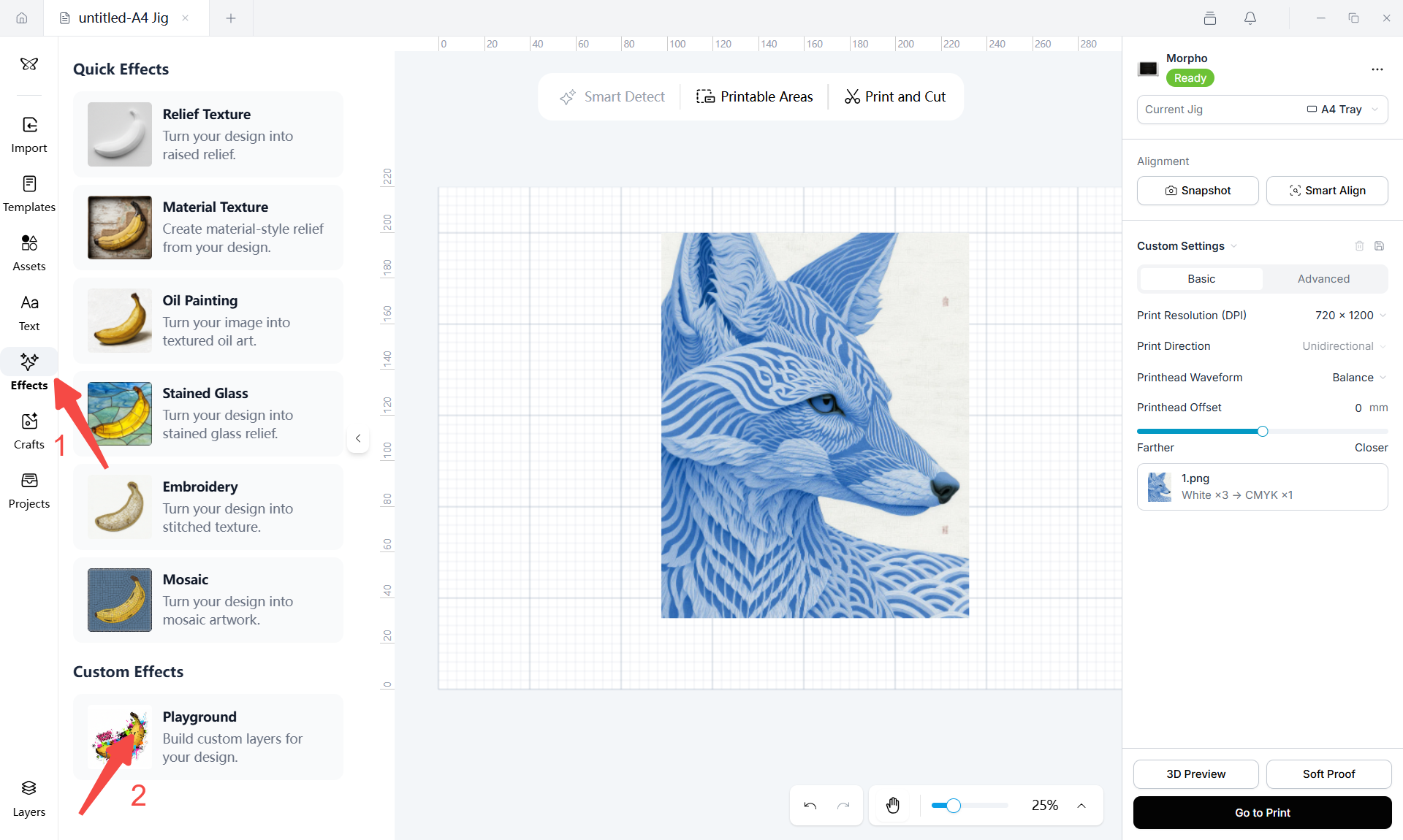
- In the left sidebar, open Effects, then select Playground. The Relief Effects dialog will open, where you can configure custom print layers for the design.
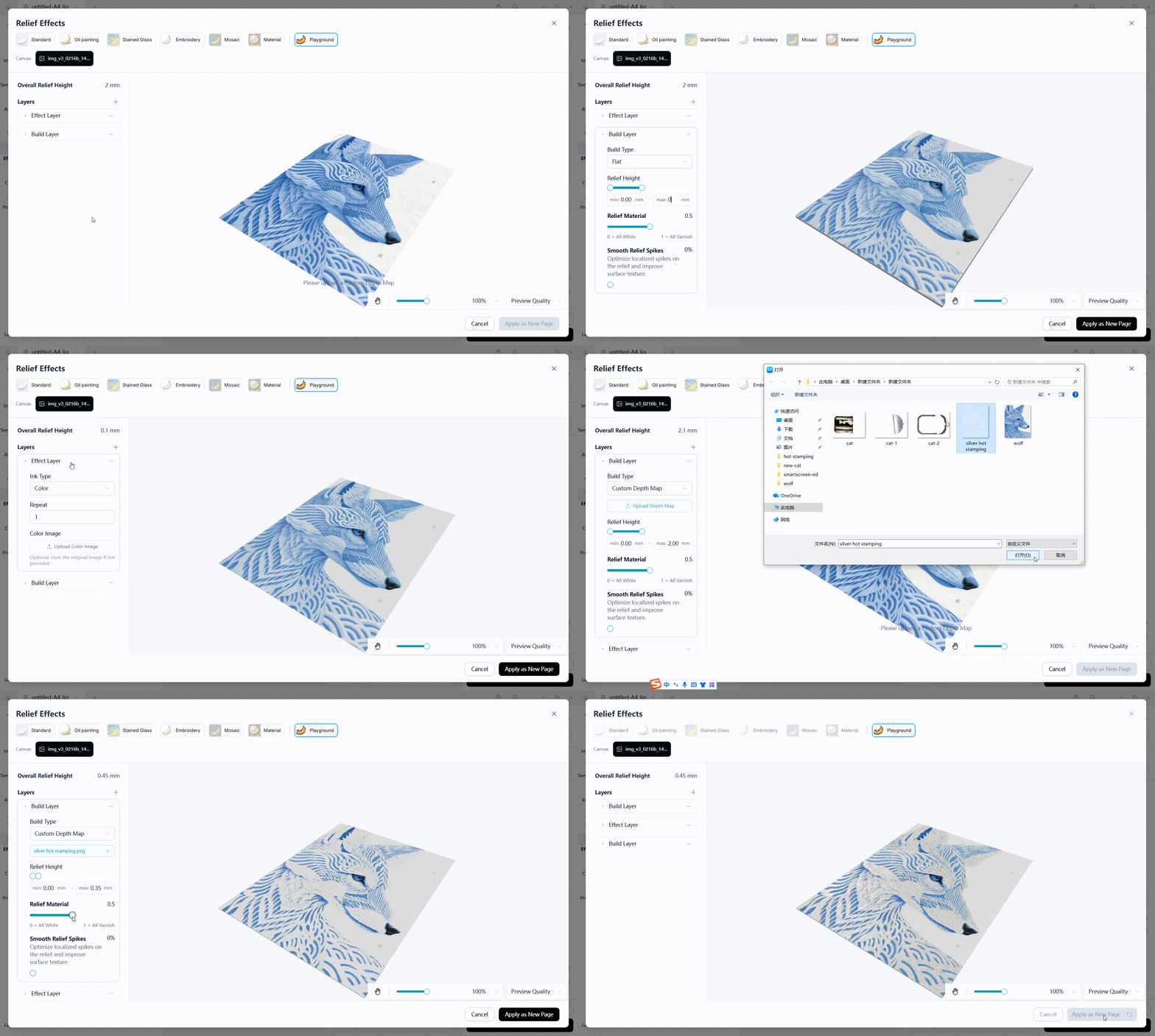
- In the Relief Effects dialog, configure the layers from bottom to top: set the bottom build layer to a height of 0.1 mm and set Relief Material to 0.5 so that the white ink and varnish channels work together to improve relief-layer printing efficiency; place the color image on the middle layer; then import the extracted silver-stamping artwork on the top layer and set it as the silver-stamping relief layer using hot-stamping varnish. The following settings are provided for reference.
- Tap Snapshot. The printer captures the printed material on the tray, identifies its outline and height, and uses the result for design alignment and print-height calculation.
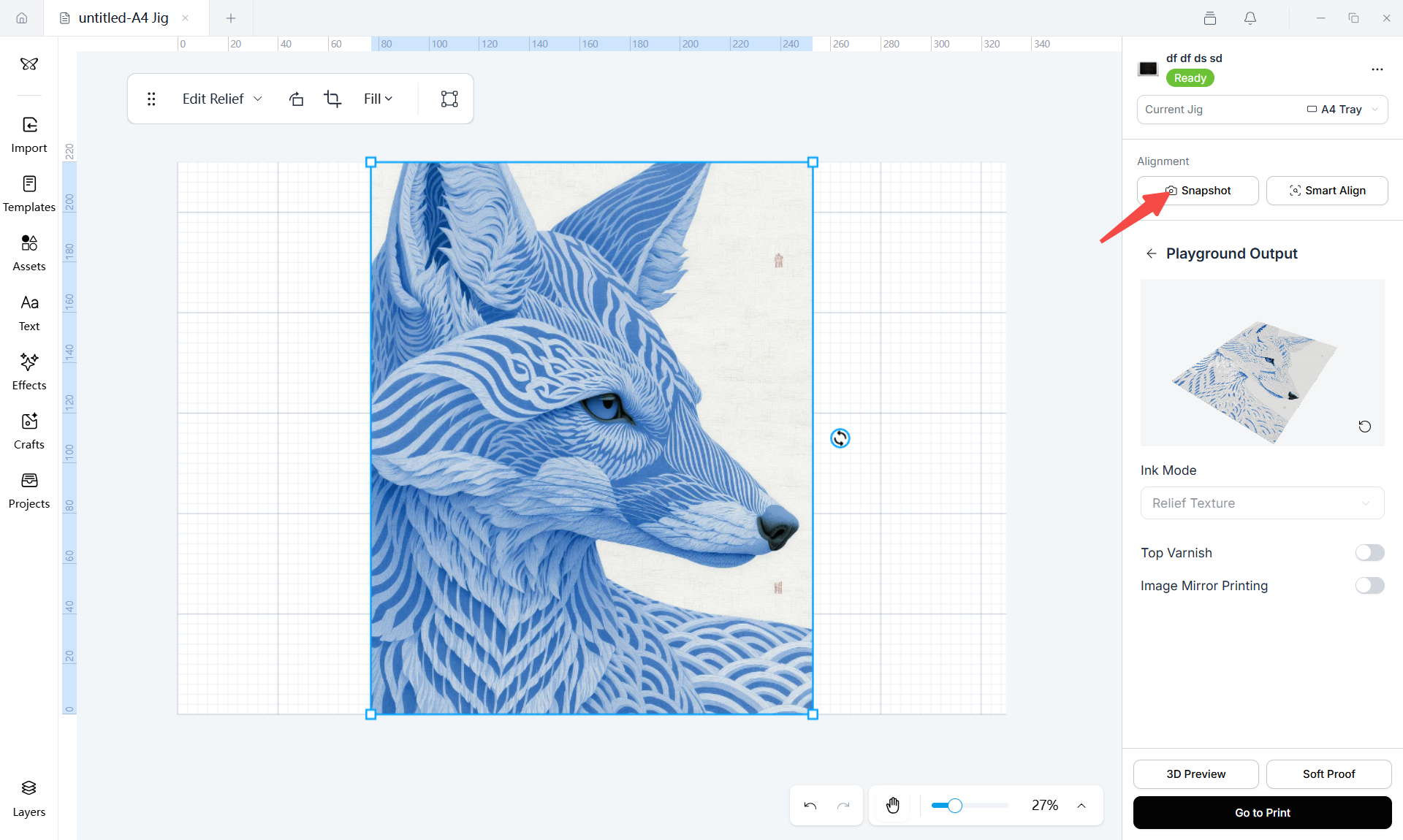
- In the Alignment section, position and resize the hot-stamping design. Tap Go to Print.
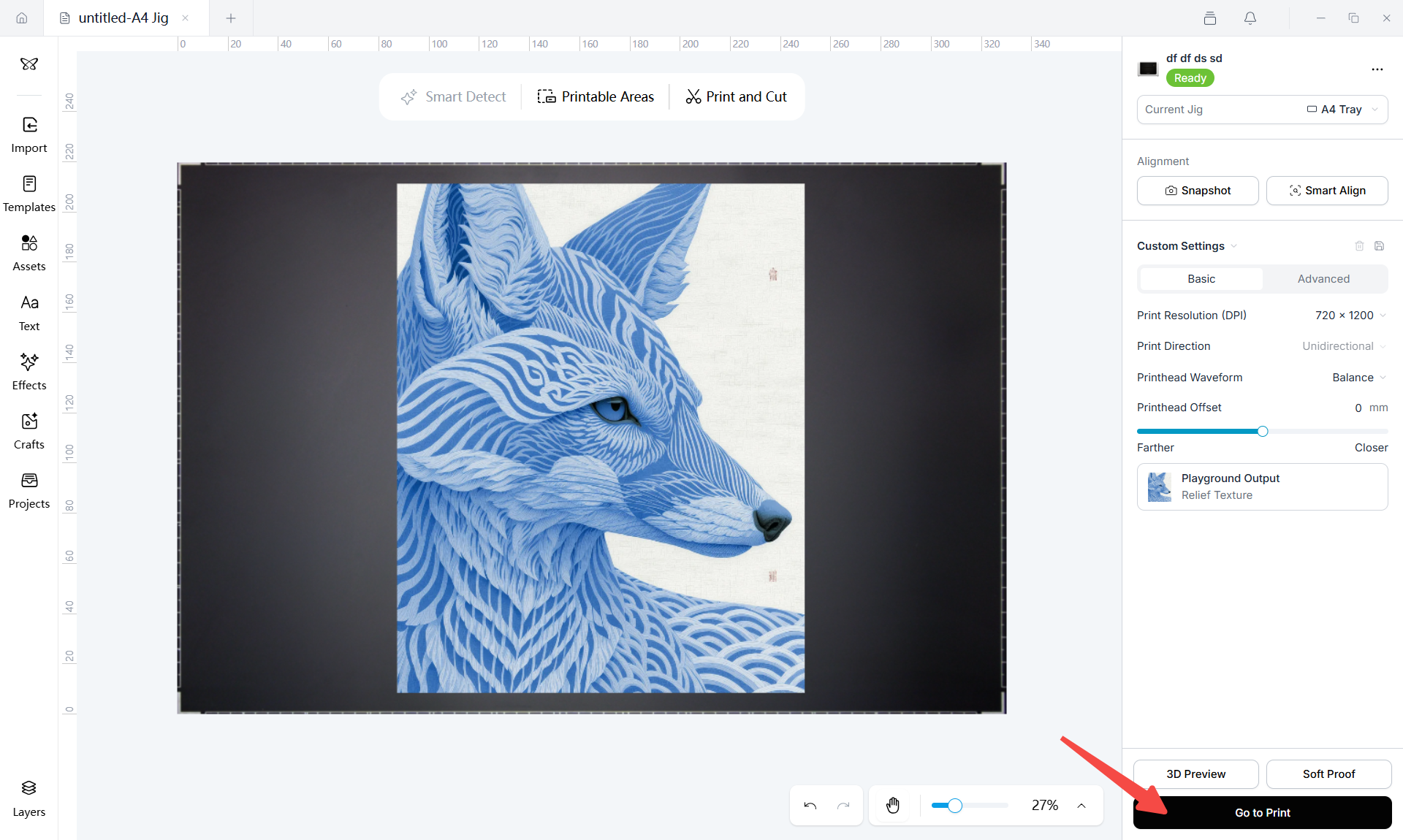
- After printing is complete, remove the printed material and proceed to hot-stamping foil application.
¶ Dual-Layer Hot Stamping
Dual-layer hot stamping is used when the same print material requires a color print followed by silver- and gold-foil application. Prepare and print the color, silver-stamping, and gold-stamping layers sequentially within the same project. Depending on the design requirements and artwork, you may print and apply either the silver-stamping layer or the gold-stamping layer first. The following example applies the silver foil first, followed by the gold foil.
- Open Morpho Studio and tap Create New to create a new print project.
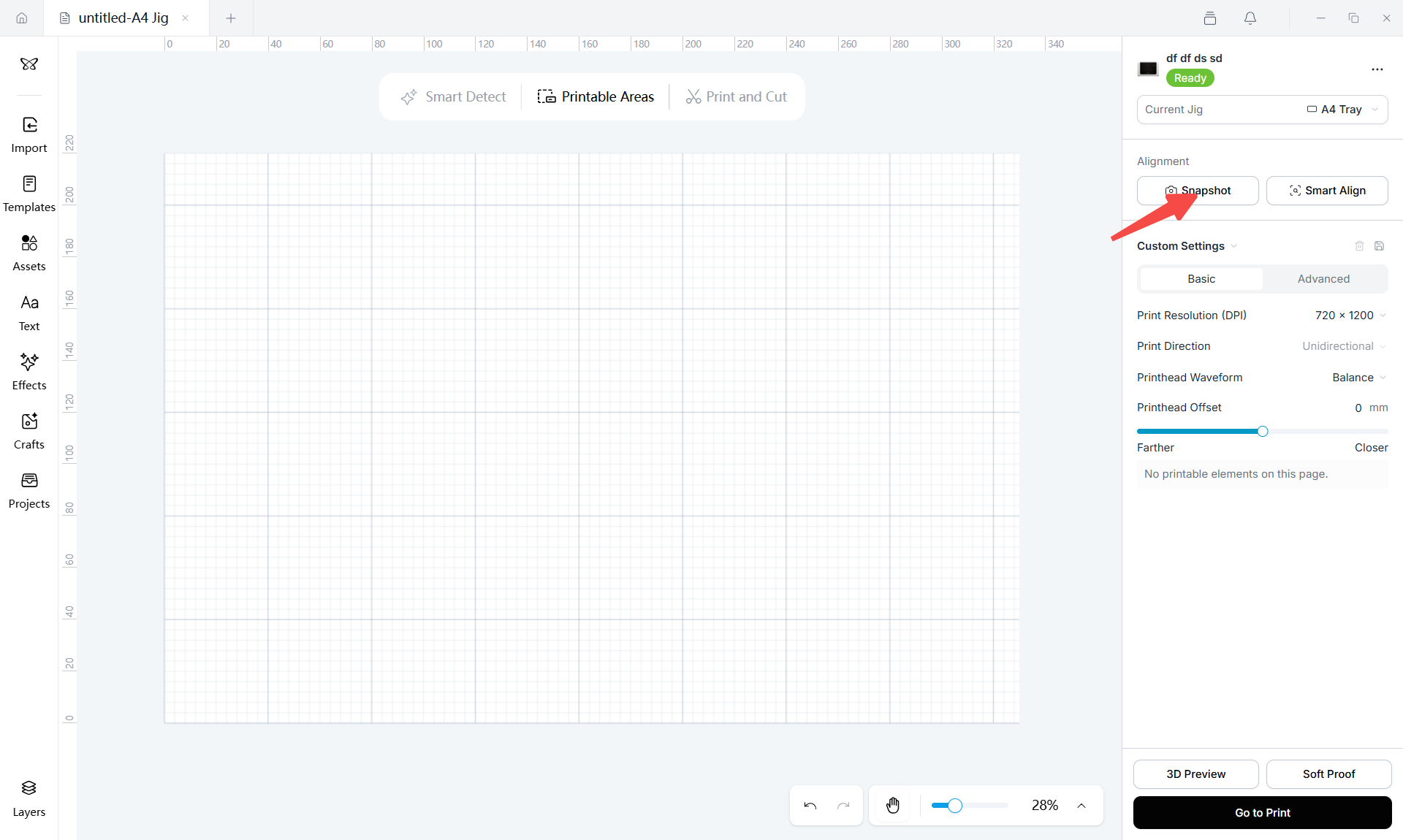
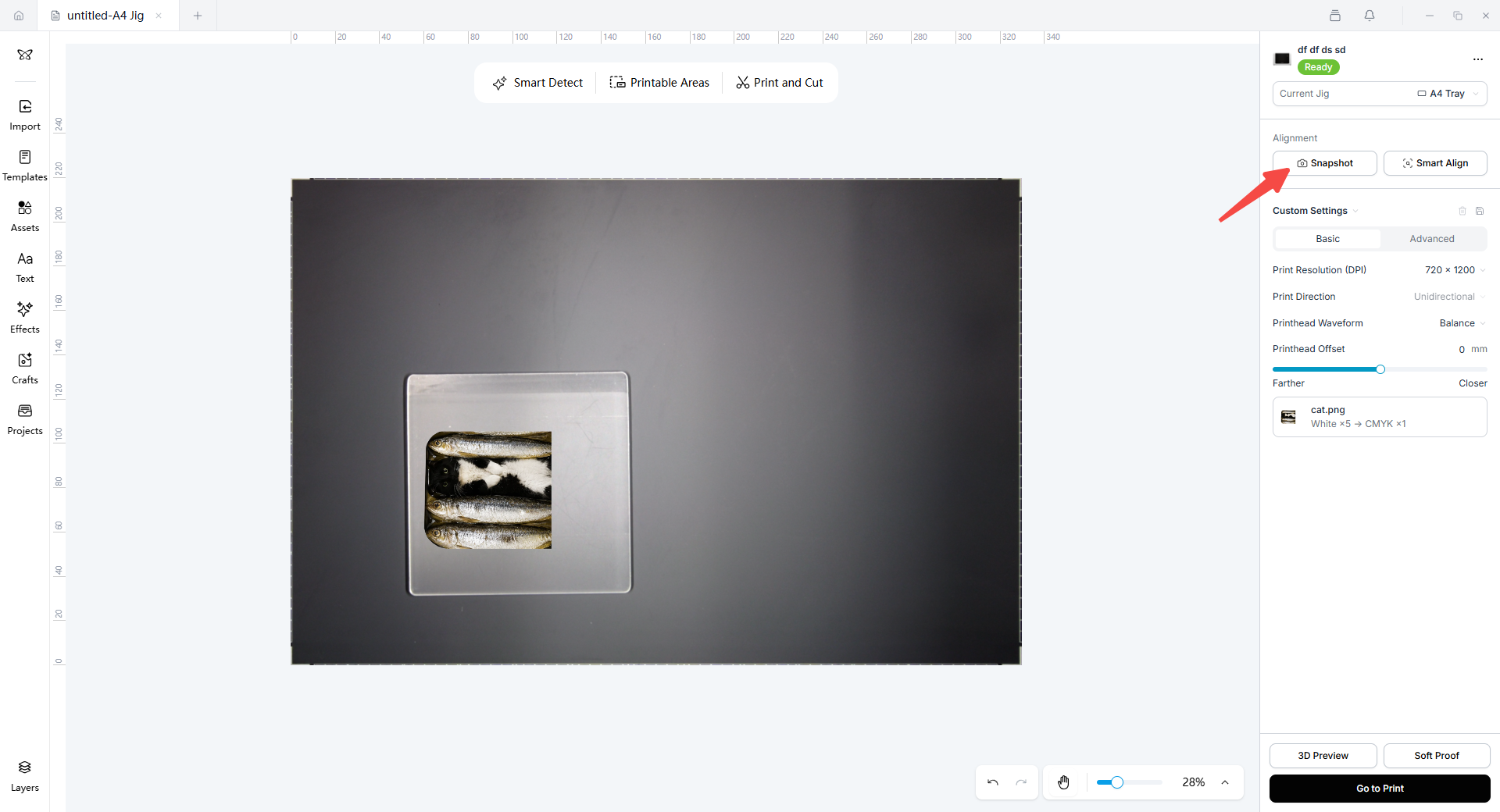
- Tap Snapshot.
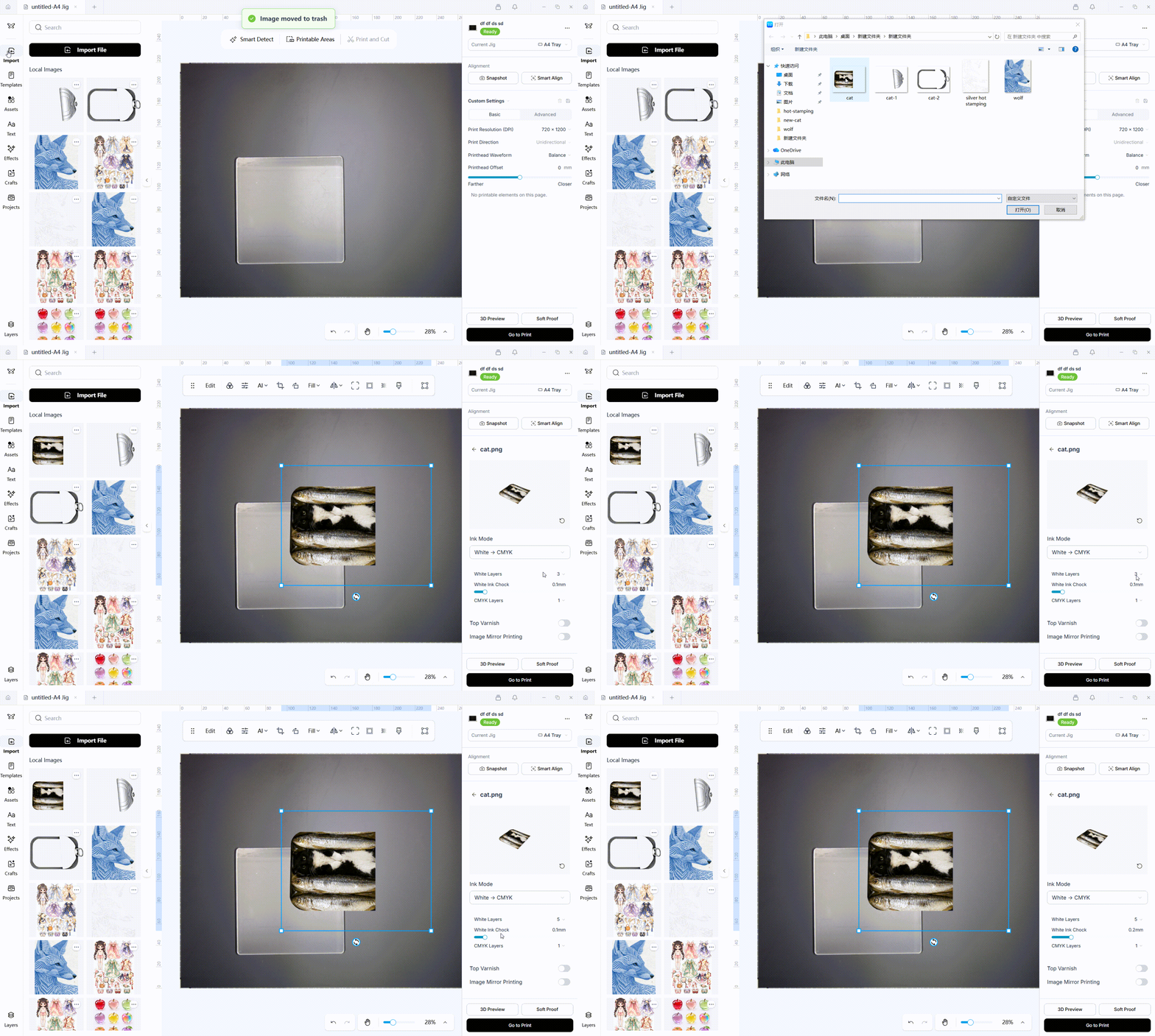
- Import the color image and set the color print parameters.
- Place the color image in the corresponding position on the print material and tap Go to Print to print the color image first.
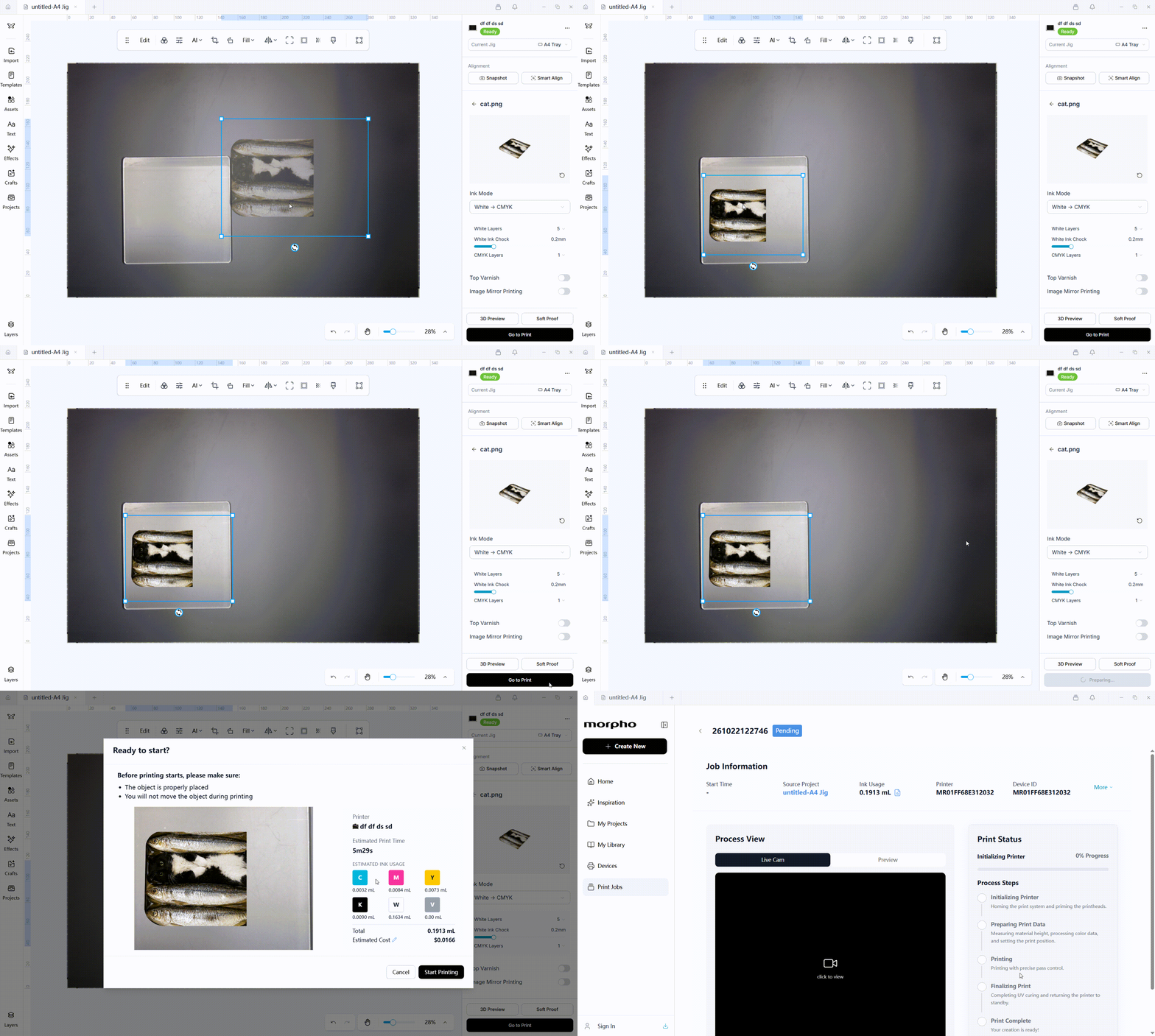
- After the color image is printed, do not move the print material. Tap Snapshot again to update the detected outline and height before continuing with the silver-stamping layer.
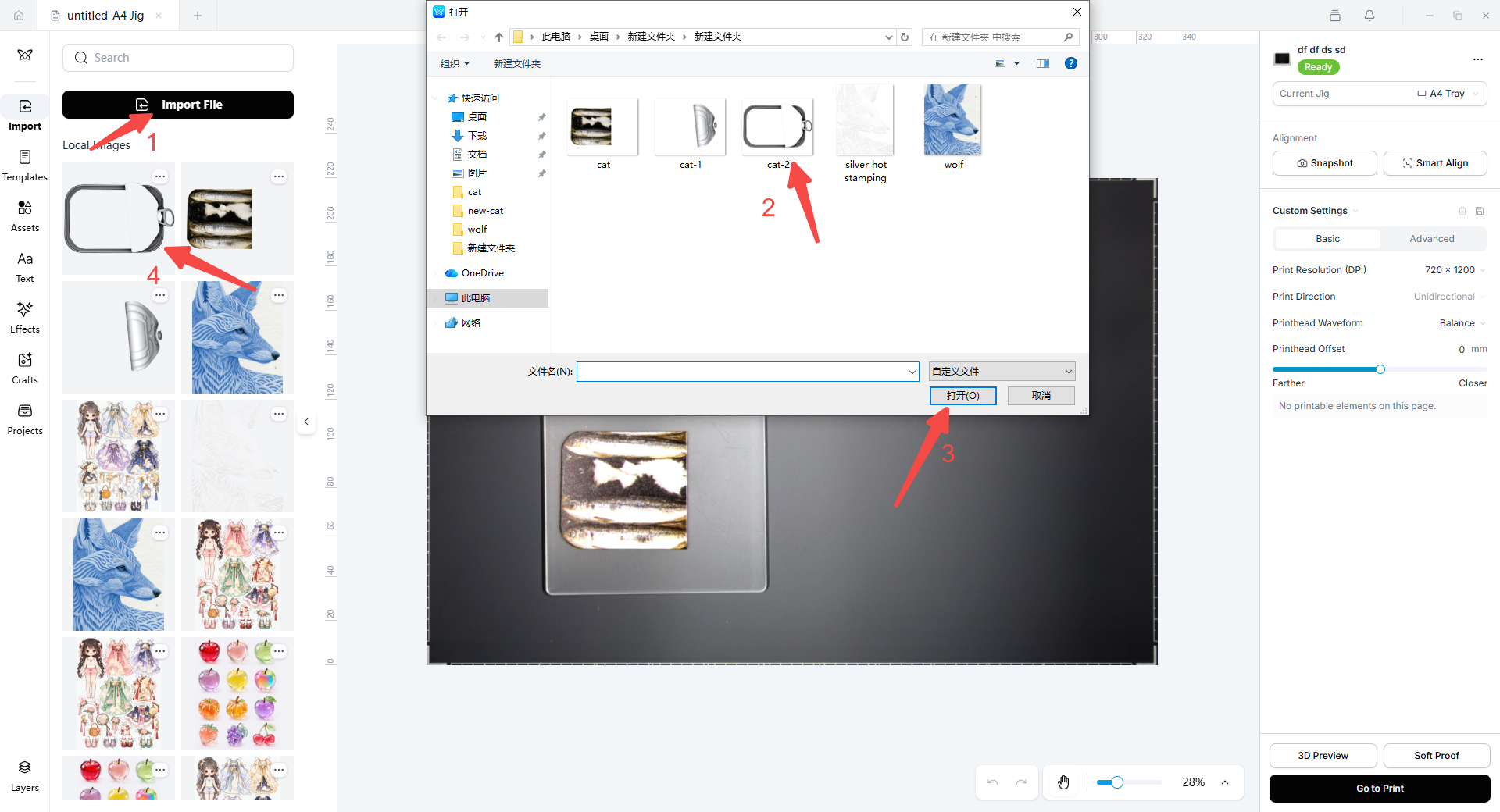
- Import Image 2, which contains the silver-stamping area of the pull tab.
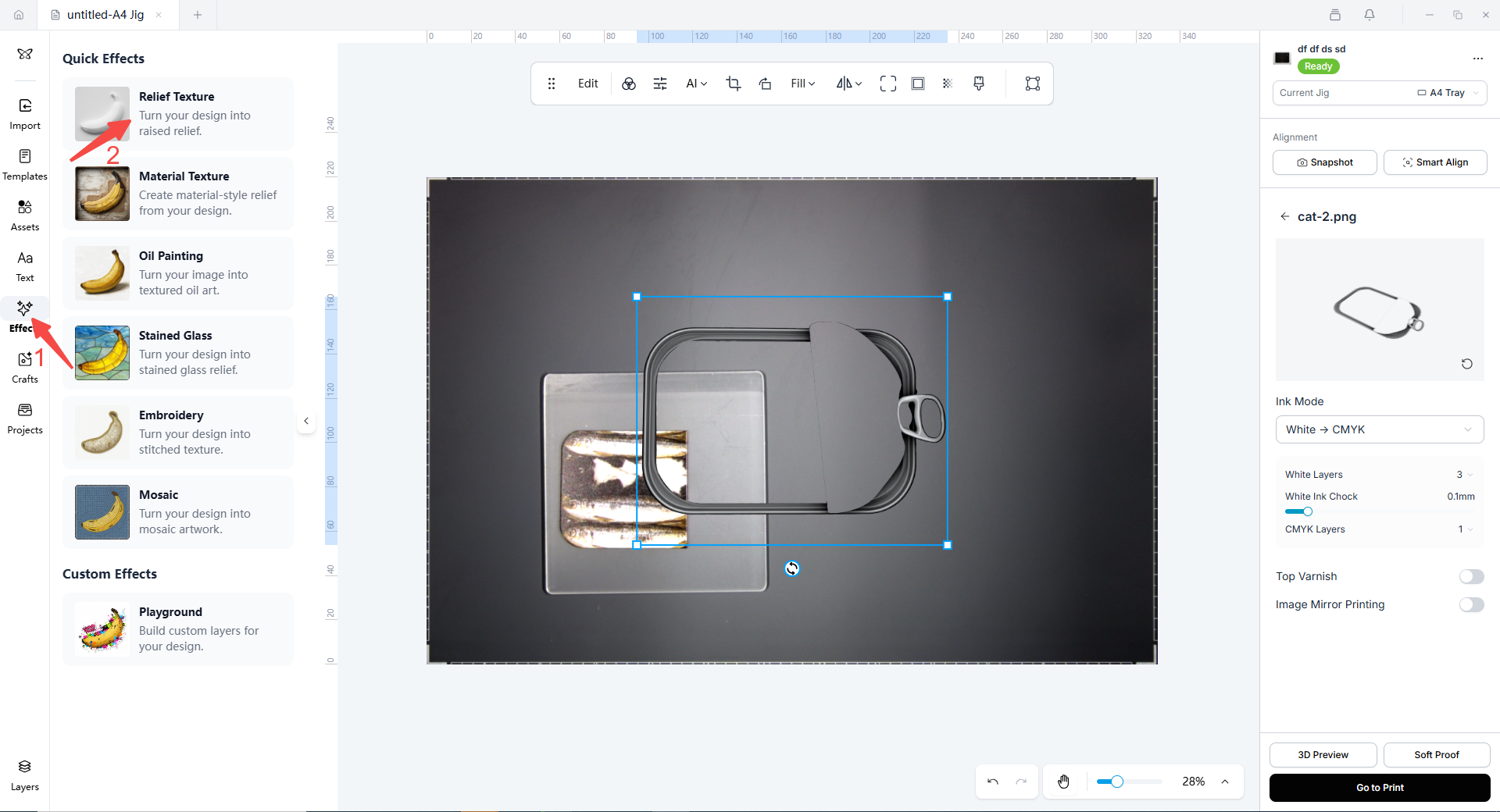
- Tap Effects on the left, then select Relief Texture.
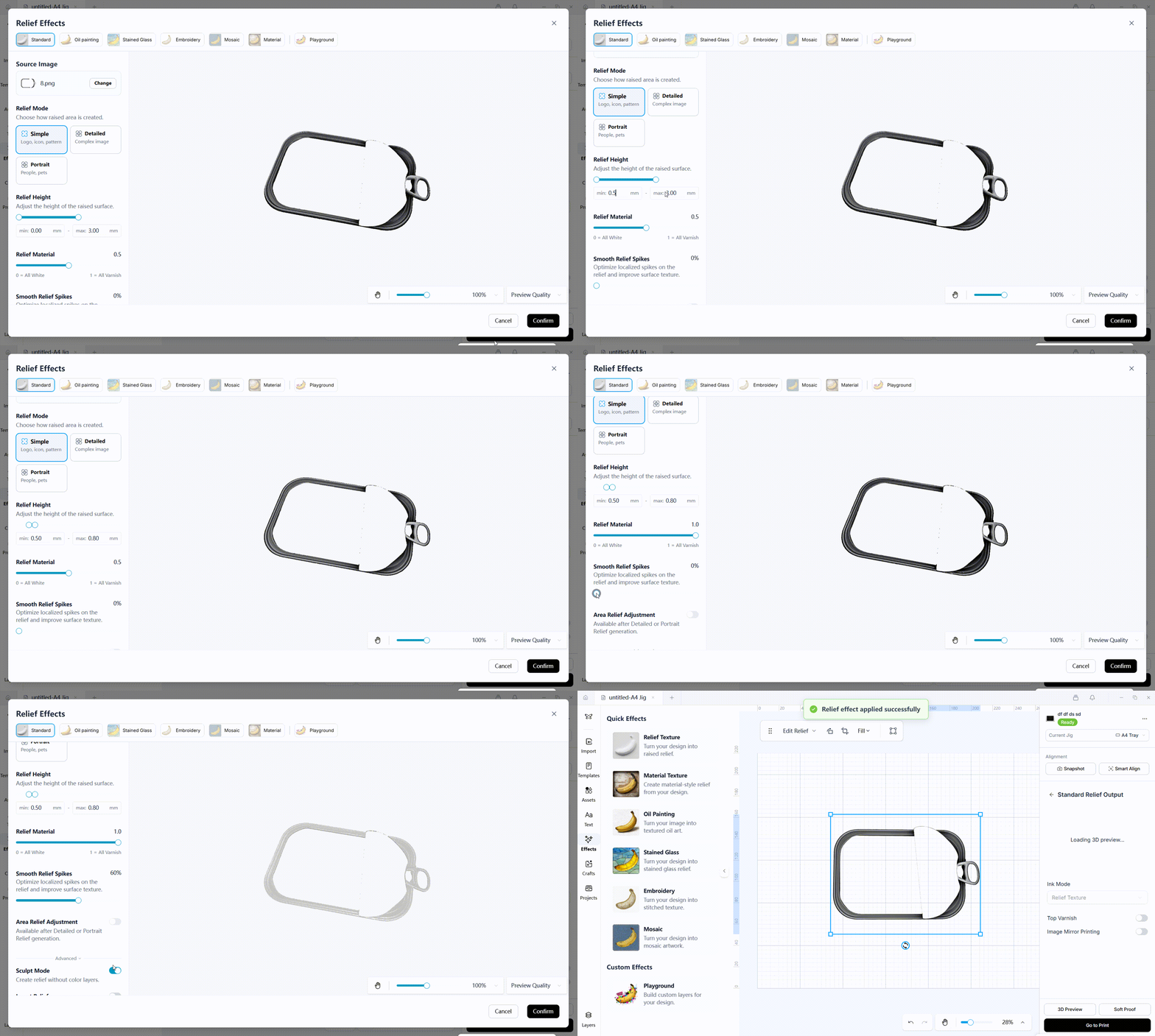
- Set the hot-stamping varnish relief parameters for the silver-stamping area. Use the screenshots below as a parameter reference.
- Drag the silver-stamping layer to the corresponding position on the print material, then tap Go to Print to print the silver hot-stamping varnish relief layer.
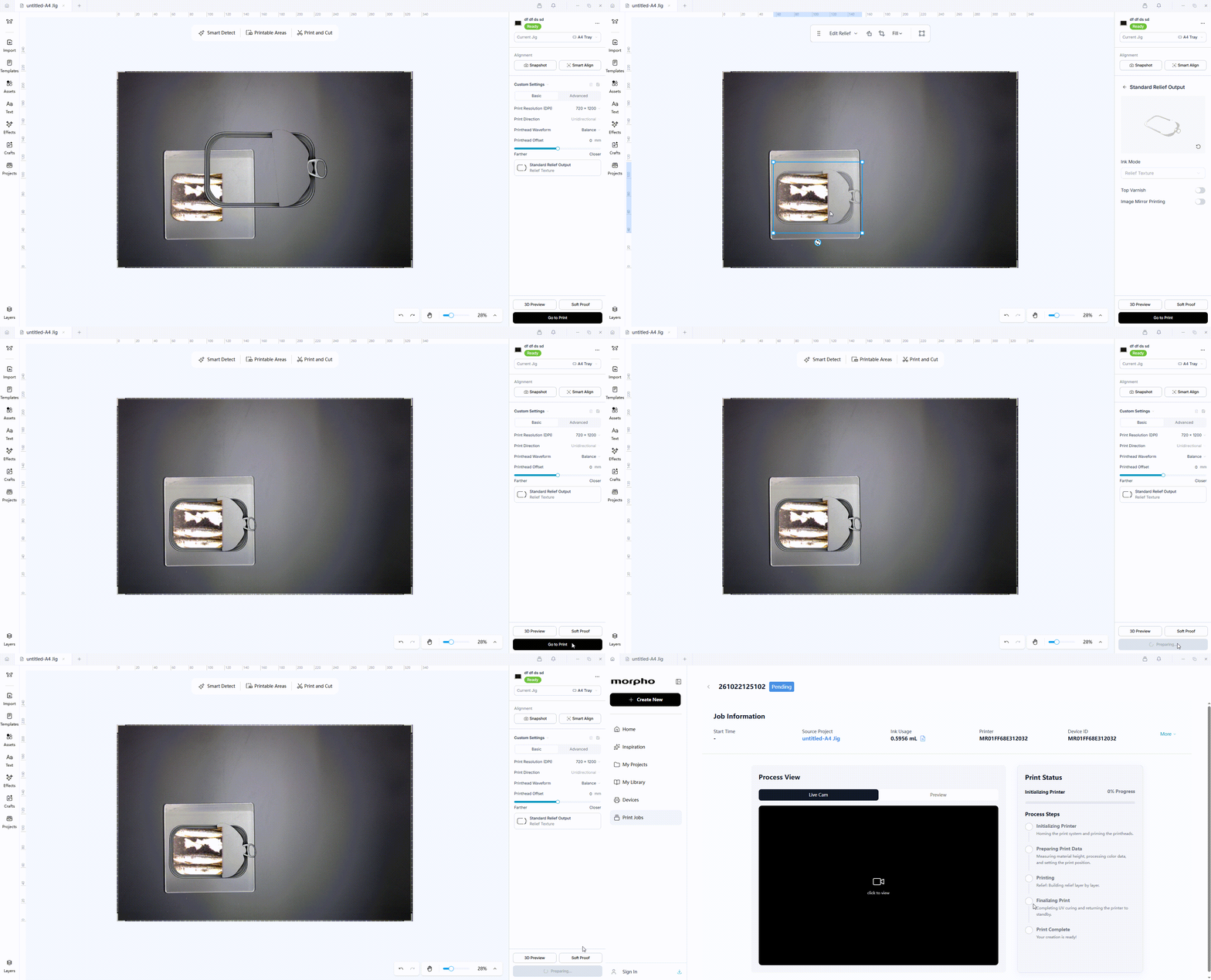
- After the silver hot-stamping varnish relief layer is printed, remove the printed material and place it in the laminator to apply the silver hot-stamping foil. After the silver foil has been applied, allow the printed material to cool naturally, then remove the excess silver foil. Return the printed material to the printer tray. Because the printed material has been removed and repositioned, tap Snapshot again to remeasure its height and outline.
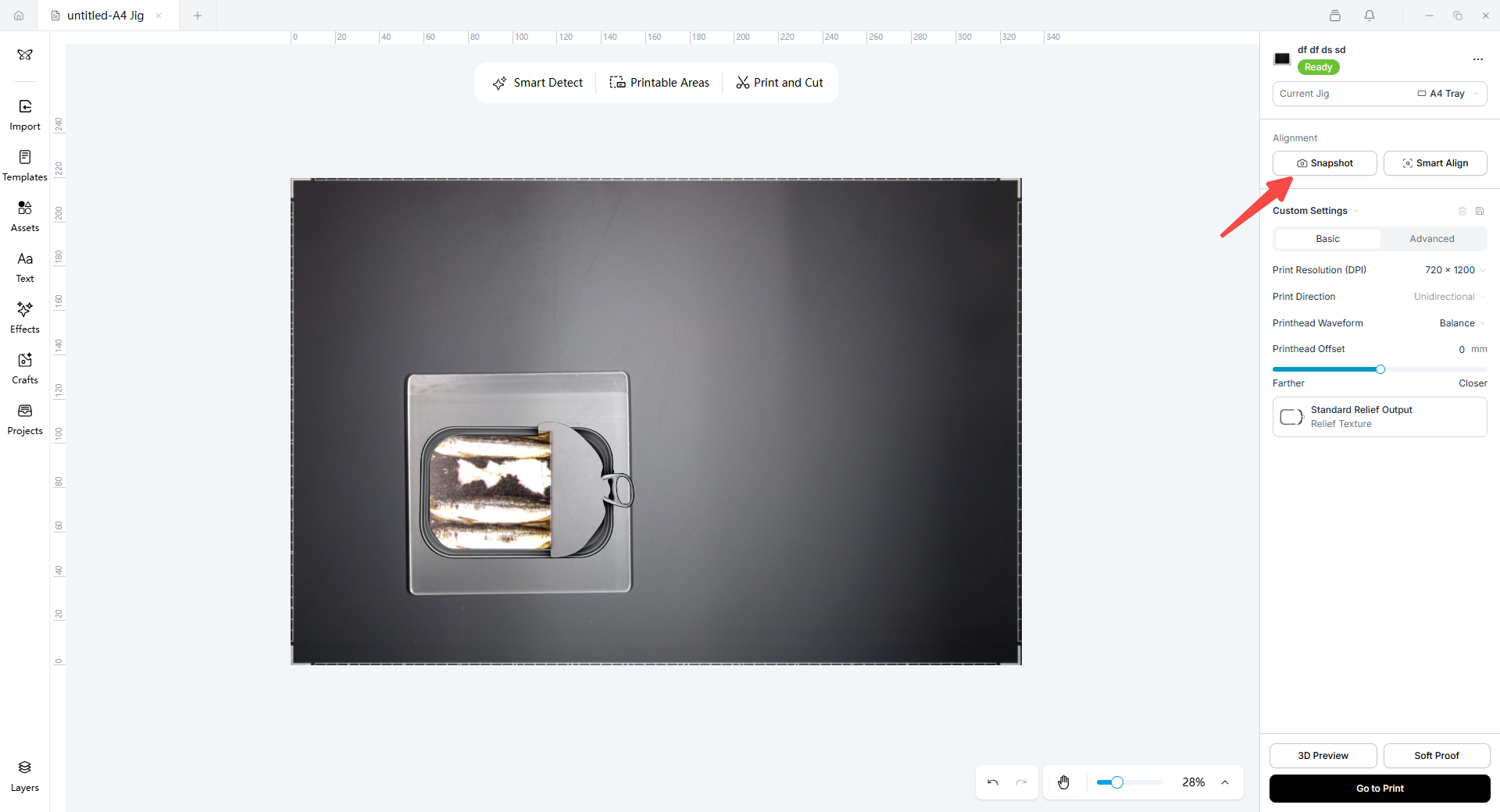
- Import Image 3, which contains the gold-stamping area. Tap Effects, then select Relief Texture.
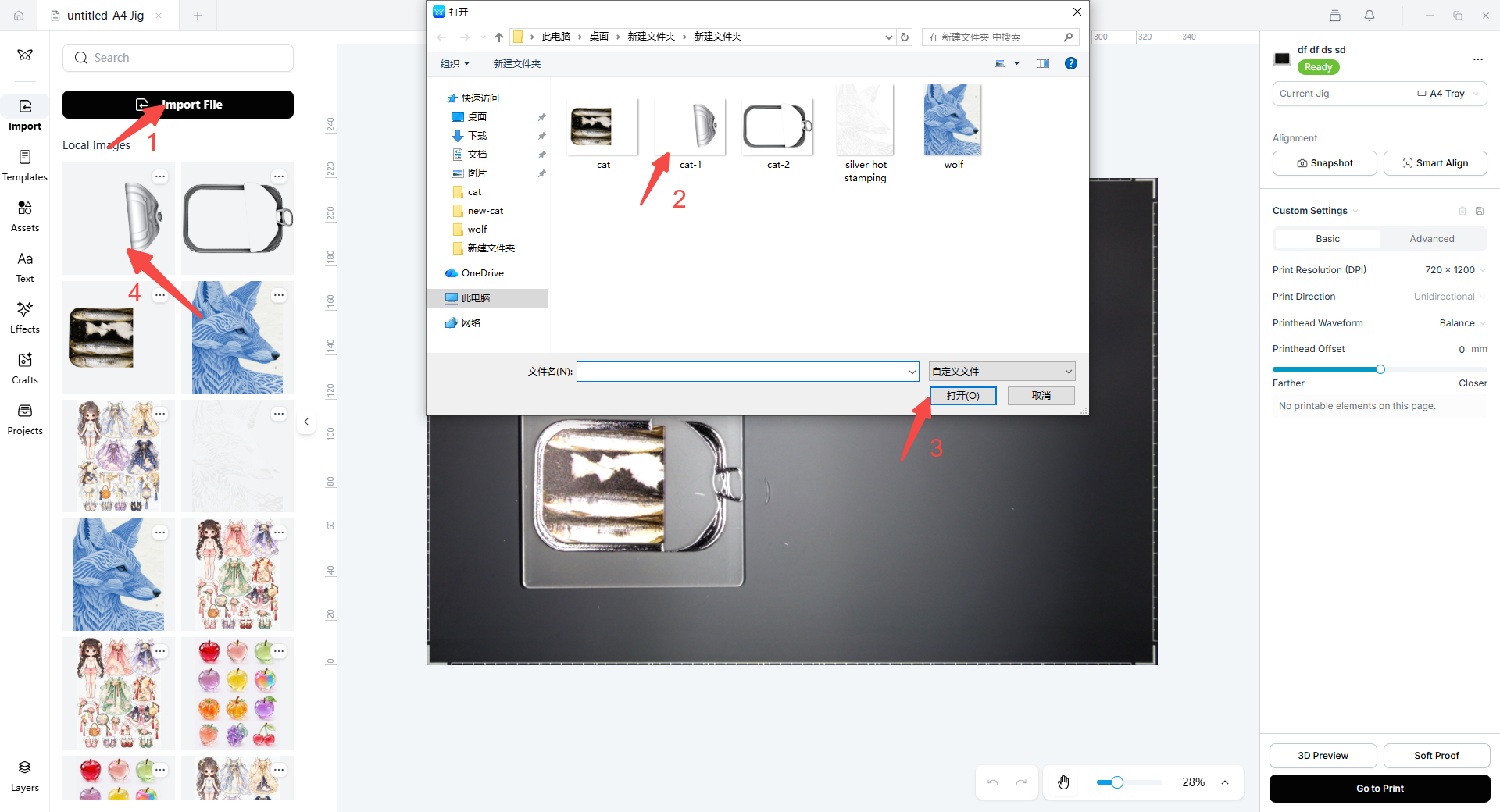
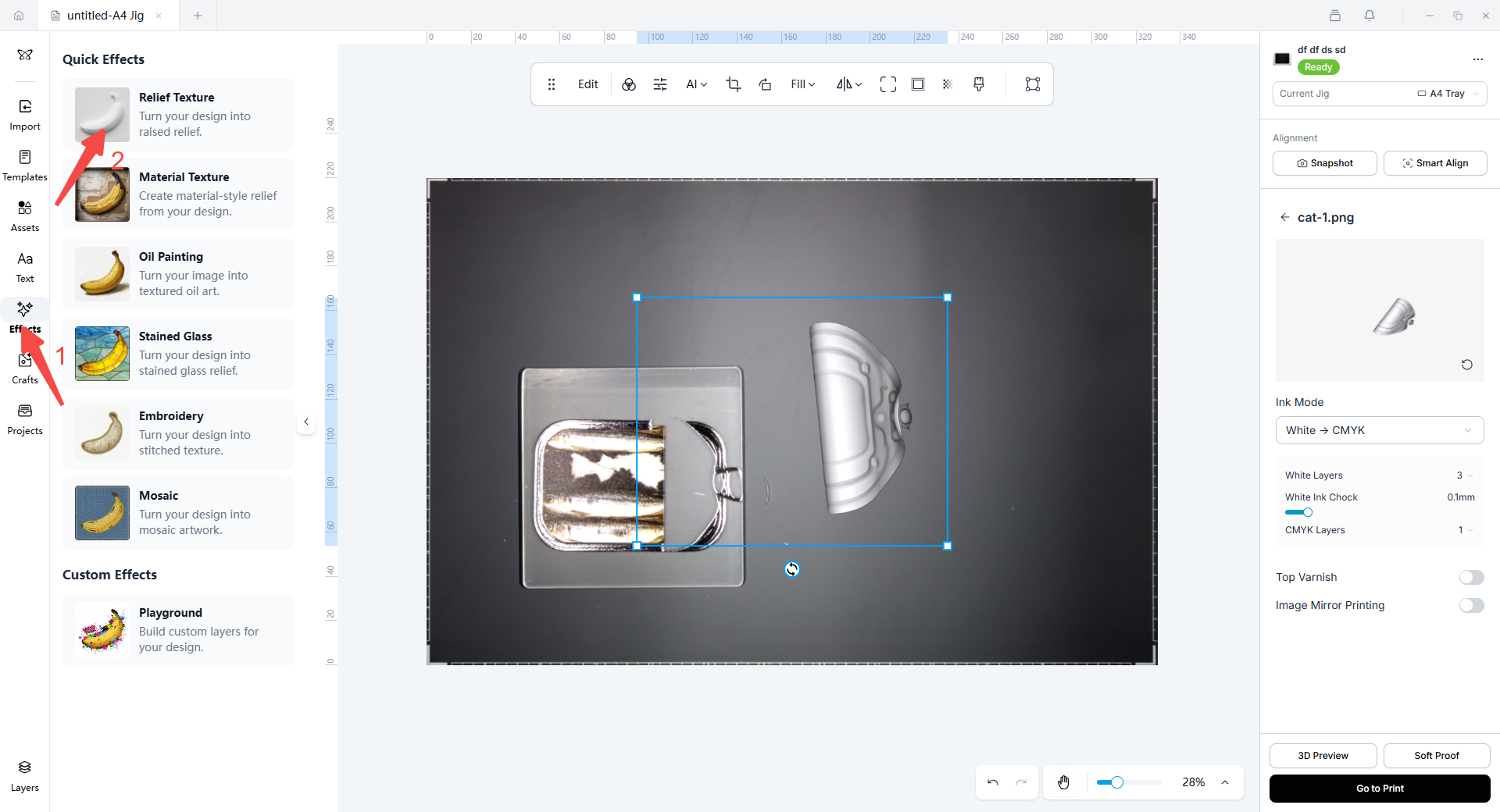
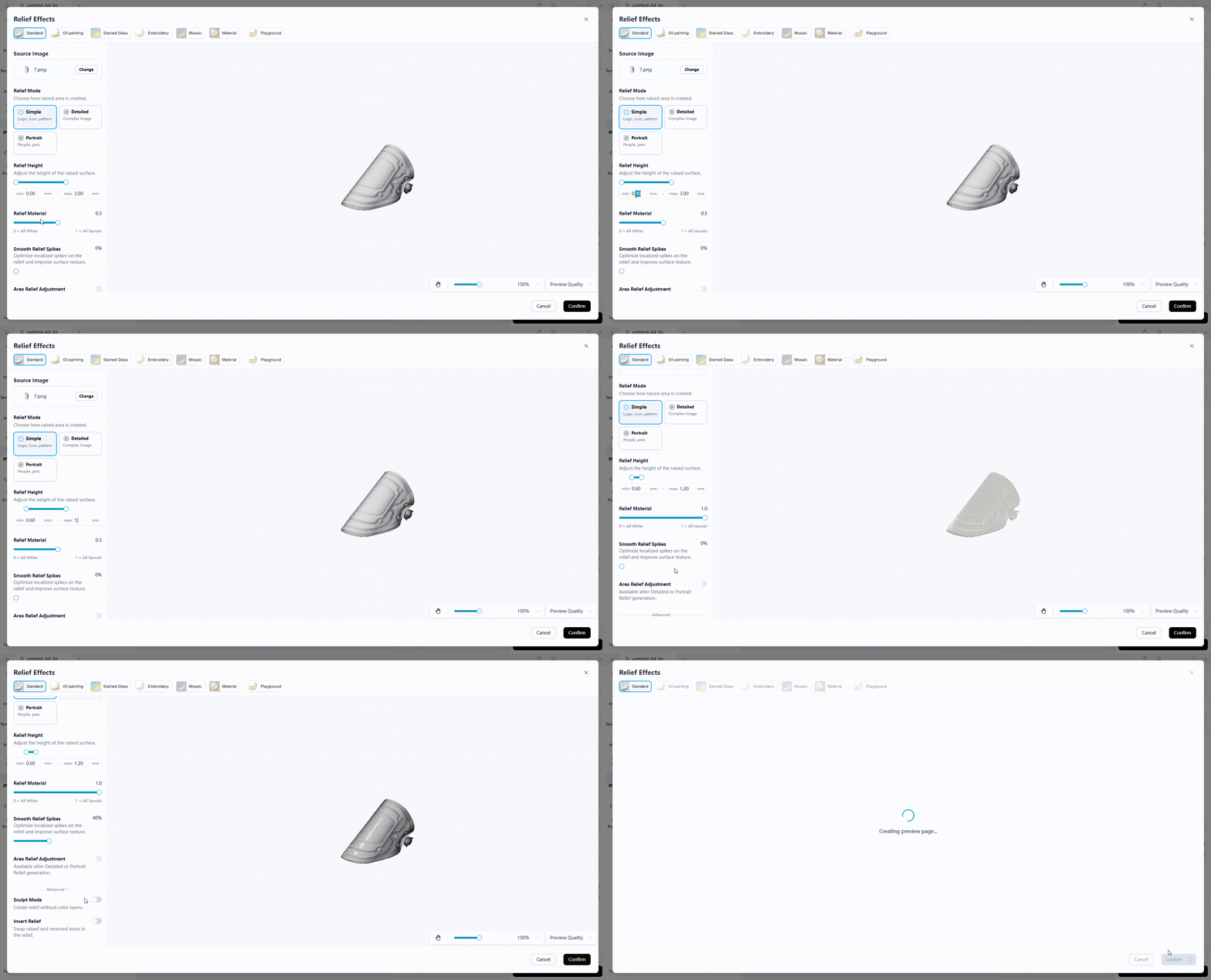
- Set the hot-stamping varnish relief parameters for the gold-stamping area. Use the screenshot below as a reference for the settings.
- Drag the gold-stamping layer to the corresponding position on the print material, then tap Go to Print to print the gold hot-stamping varnish relief layer.
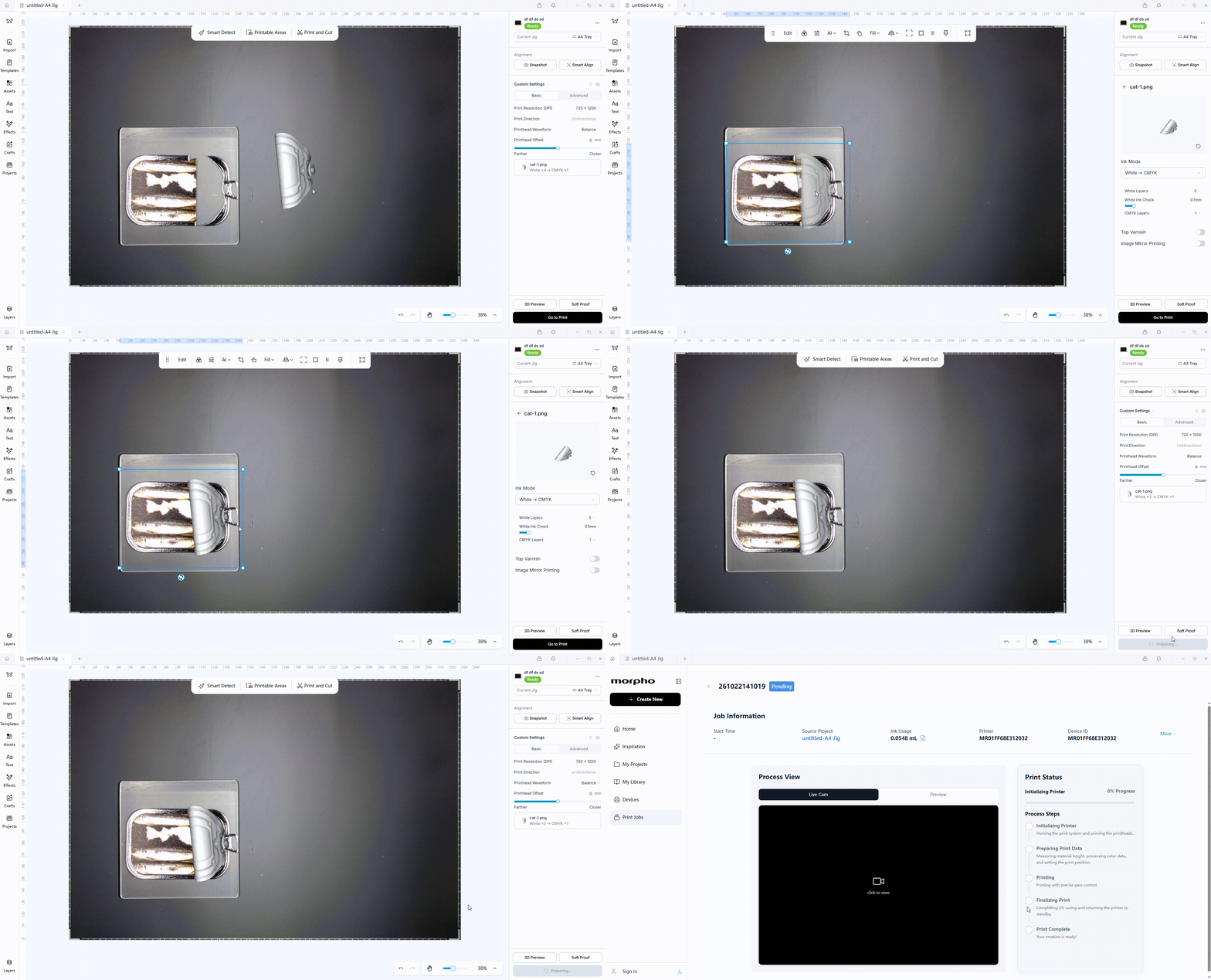
- After the gold hot-stamping varnish relief layer is printed, remove the printed material from the printer and place it in the laminator to apply the gold hot-stamping foil. After the gold foil has been applied, allow the printed material to cool naturally, then remove the excess gold foil. Once the excess foil has been removed, the dual-layer hot-stamping effect is finished.
¶ Hot-Stamping Foil Lamination Process
|
1
Inspect the Laminator
Check that the unwind shaft, guide roller, and pressure roller are clean and parallel. Make sure that the roller surfaces are free from adhesive residue, burrs, and other debris. |
|
2
Install and Thread the Hot-Stamping Foil
Install the hot-stamping foil in reverse-wound orientation, with the functional side facing the printed hot-stamping varnish layer. Mount the foil on the unwind shaft without clamping it too tightly. Keep the left and right edges approximately parallel to the machine centerline and maintain even tension. Make sure the foil surface is free from dust, grease, fingerprints, and creases. Handle the foil by its edges whenever possible, and keep it flat without overtightening it. |
|
3
Set the Heating Temperature
Set the laminator temperature to approximately 80°C for gold and silver hot stamping. |
|
4
Prepare and Perform the Trial Lamination
Prepare the trial material and adjust the laminator roller gap according to the thickness of the trial material. A flat, rigid cardboard sheet with rounded corners or the device-specific leader sheet may be used to assist with foil feeding. The cardboard width must be less than the width of the hot-stamping foil. After the rollers reach the specified temperature, use both hands to guide the trial material from the front platform into the heated rollers. Confirm that the hot-stamping foil feeds steadily through the laminator and that the trial material exits the rollers smoothly. Note: Do not pull the foil backward by hand or force thick cardboard into the laminator. |
|
5
Adjust the Trial Parameters if Necessary
If the foil is deformed, has uneven gloss, shows pressure marks, or causes hot-stamping varnish squeeze-out, adjust the roller gap to reduce the lamination pressure or lower the laminator temperature. If bubbles, silver streaks, or localized non-bonding occur, check the print material surface cleanliness, roller condition, printed thickness, relief height difference, foil tension, bonding pressure, and laminator temperature. It is recommended to repeat the trial lamination whenever the foil, print material, adhesive or varnish, or equipment is changed. |
|
6
Readjust the Roller Gap and Perform the Final Lamination
After the trial result is qualified, readjust the laminator roller gap based on the combined thickness of the print material, standard white ink layer, and hot-stamping varnish relief layer. Keep the equipment speed, pressure, and temperature unchanged. Use both hands to position the printed material accurately on the appropriate area of the front platform and feed it into the heated rollers for hot-press transfer. Continuously monitor both foil edges and the bonding area during lamination. Avoid frequent stops, emergency stops, and sudden speed increases. |
|
7
Cool the Printed Material and Remove the Excess Foil
Allow the printed material to cool naturally, then peel away the excess foil. The metallic foil should remain only on the areas printed with hot-stamping varnish, completing the hot-stamping effect. |
Morpho will introduce a Roll-to-Roll Jig in the future to provide a one-stop solution for the hot stamping and lamination process.
¶ 5. Verify the Result
| A qualified result should meet the following criteria: the foil fully adheres to the specified design area, edges are clean, fine lines have no obvious breaks, non-stamping areas have no obvious sticking, and the surface has no obvious wrinkles, stretch marks, or film tearing. |
¶ 6. Troubleshooting and Exception Handling
Use the checks below when the result does not meet the acceptance criteria.
| Observed result | Checks and next action |
|---|---|
| The material cannot enter the laminator or lamination cannot be completed. | Check the total thickness of the print material, standard white ink layer, and hot-stamping varnish relief layer against the laminator's adjustable roller-gap range. If the total thickness exceeds the adjustment range, do not continue lamination. |
| Foil transfer is incomplete or missing in local areas. | Check whether the printed hot-stamping varnish layer is at least 0.2 mm thick. For raised hot-stamping effects, check whether the height difference between areas is excessive. Also check that the hot-stamping varnish specified in this guide was used, that the printed design faces the foil, and that the print material and foil are clean. Verify the roller gap and hot-stamping temperature. Make sure that the foil lies flat and is not overtightened, check for excessive unwind resistance, and do not pull the foil backward by hand. |
| The foil has wrinkles, stretch marks, distortion, or tearing. | Check that the foil is naturally flat and not over-tightened. Reduce excessive unwind resistance and do not pull the foil backward by hand. Check the relief height difference and the total thickness before another attempt. |
| Fine lines break, details are lost, or adjacent areas stick together. | Review the hot-stamping area image. Avoid gradients, semi-transparent areas, and lines that are too thin. Maintain a line width of 0.3–0.5 mm where applicable and spacing of at least 0.4 mm between adjacent lines or cutout areas. For print materials with rough surfaces, high ink absorption, or deep-embossed hot-stamping processes, consider increasing the line width and spacing as appropriate to preserve design integrity and improve the foil-transfer success rate. |
For technical questions about hot stamping, foil lamination, or the settings described in this guide, contact Morpho Support.